
Frequently Asked Questions
The electronic bag tag device replaces the paper luggage label that you would normally receive from a check-in counter or self service check-in kiosk
BAGTAG devices from AEGEAN, do not have an on/off switch. They run on the mobile device battery when it is updated with flight information.
Download the Aegean app and follow the steps, provided that Bluetooth/NFC and internet are functioning correctly.
1. Enter your email (if it’s not already prefilled)
2. Select the flight you wish
3. Select Activate with NFC and follow the instructions on the screen
4. You’re now ready to take your baggage to the self-service kiosk.
Once you complete the flight check-in via the AEGEAN app (within 48 hours), you can update the BAGTAG device with your baggage information.
Baggage will be weighed at the AEGEAN check-in counters (baggage drop off). Overweight baggage will incur an additional charge which you can view in detail in the extra & overweight baggage section.
Any mobile device with operating system:
- Android 5.0 or higher,
- iOS 11.0 or higher
The BAGTAG also requires a mobile device equipped with Bluetooth/NFC in order to perform updates correctly.
No, the device is batteryless.
Wrap the AEGEAN bagtag strap around the baggage handle and insert the strap in the back slot of the device as shown below. Make sure the bagtag is securely attached by tightening the strap very well.
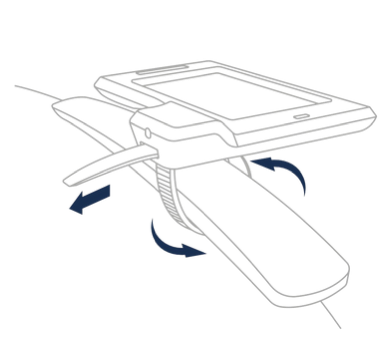
If you have the device with the flexible strap, to place it in your luggage fasten the strap around the handle until tightly attached, firmly pull the closest strap hole over the buckle pin, pull the strap through the buckle and tuck under the handle.
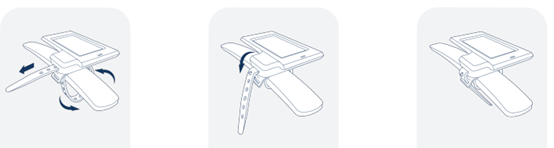
To unlock the Bag tag insert the security pin in the slot located on the right side of the device. Applying inward pressure on the security pin will unlock the device and release the strap.
If you have the device with the flexible strap, no pin is required to remove it.
BAGTAG is flexible. It can be attached and removed from any baggage. Using the security pin the device can be unlocked and reattached to any other baggage.
The baggage label is transferred to the BAGTAG device from within the AAEGEAN App. This option is available after check-in or from your mobile boarding pass with the the AEGEAN App.
The pairing is initiated once the blue indicator on the BAGTAG device lights up and your mobile device vibrates.
To do this you have to:
- ensure that your phone is laying flat against the BAGTAG, (screen facing outward)
- locate the NFC symbols on the electronic bag tag. Align your phone's NFC antenna with this spot.
- hold both devices still until the process is completed and your mobile device indicates a successful update before moving it.
If the blue light doesn't light up or is flickering, make slow, small adjustments to your device's placement until you see a solid blue light.
If above does not work, try removing your mobile device's protective case.
The location of the NFC antenna varies depending on smartphone and model. Please view the below example for possible NFC-locations on Apple and Android mobile devices.

The only way to update BAGTAG with flight information, is through the Aegean App which needs to be downloaded on your mobile device.
The device has IP rating IP65.
This means that the BAGTAG is protected against liquids sprayed or splashed and can withstand dust but cannot be submerged underwater and maintain its functionality.
BAGTAG can be used in specific airports.
Υou can drop off baggage at a staff-operated AEGEAN check-in desk.
If the code share flight is operated by Aegean or Olympic Air, you can use your device as long as this is supported by the departure airport. See the limitations here.
For flights operated by partner airlines you can use your device if it is supported by the airline operating the flight. You will need to consult the airline you are traveling with for more information.
Due to security reasons, the electronic bag tag can only be updated by the passenger via the AEGEAN App which needs to be installed on their mobile device.
Yes, the device displays the priority status just as the paper baggage label.
BAGTAG can only be used for regular baggage.
Please check that:
- your internet connection is working properly
- your Bluetooth is enabled
- your device supports NFC
- you installed the latest version of the AEGEAN App.
Make sure that you have checked in from the AEGEAN App and that you have the latest version installed on your mobile device.

Aegean App
Get the best out of your travel experience with the Aegean App.